
Stay in the video.
When YouTube shows its Skip button, SkipperAd taps it for you. One less reach for your phone.
Android 8.0 or newer · 300 free taps · then one payment, no subscription
How it works
Set it once. Then forget it.
SkipperAd waits quietly in the background. It only reacts while YouTube is on screen.
Turn it on
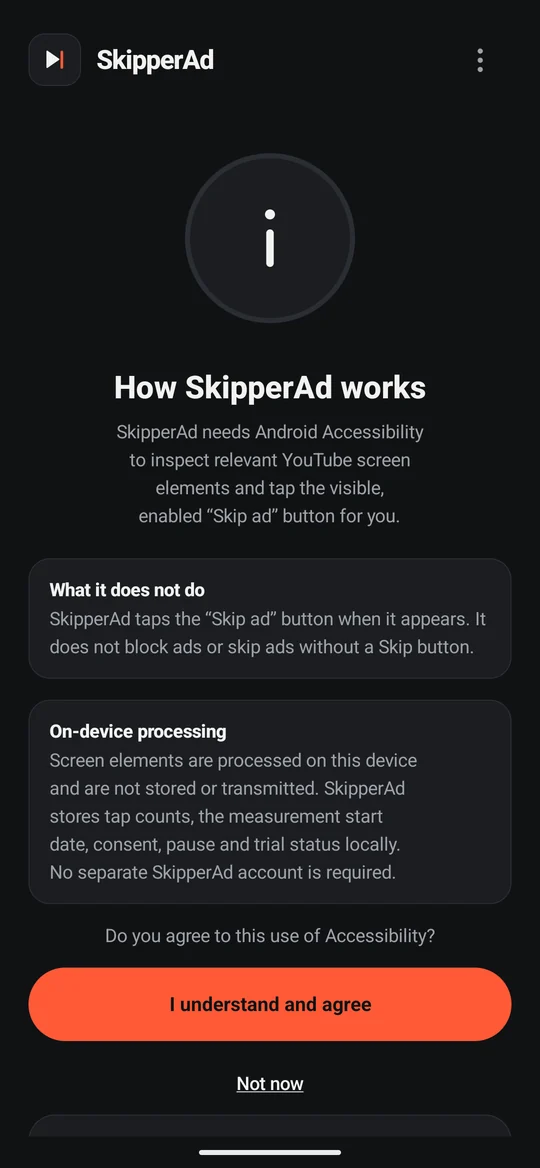
Open SkipperAd, read what it does, and enable it once in Android Accessibility settings.
Watch YouTube
Ads play as usual, countdown included. Nothing is hidden or blocked.
Skip appears, it's tapped
The moment YouTube offers a visible, enabled Skip button, SkipperAd taps it for you.
Honest by design
One job. Nothing more.
SkipperAd does exactly what you would do yourself, only without reaching for the phone.
- It does not block, hide or remove ads.
- It does not skip ads that have no Skip button, or shorten the countdown.
- It does not change YouTube, your account or your settings.
- It does not tap while a keyboard, another window or anything else covers the button.
You stay in control
Private, light and easy to stop.
On your phone only
Screen elements are read in memory to find the Skip button. Nothing is recorded, stored or sent. No account, no analytics, no ads.
Light on battery
It reacts only while YouTube is open. When YouTube is closed, it does nothing.
Pause anytime
One tap pauses it, one tap resumes. Or switch it off in Android settings. Your tap count is saved.
Pricing
Try it properly. Pay once.
No subscription, ever. Go Unlimited whenever you like. You don't have to wait for the free taps to run out.
- 300 free taps to try it in your everyday watching.
- Then one payment through Google Play for unlimited use.
- Your lifetime tap count keeps growing either way.
Free
300 taps
Every feature included.
Unlimited
∞ one payment
Price shown in Google Play for your country.
Get the app
Get SkipperAd
SkipperAd is an Android app. It will be available on Google Play soon.
On a computer? Scan the code with your phone's camera, or open the Google Play page here and choose your phone under “Install”.
Scan with your phone
Opens SkipperAd on Google Play
Works when the app is live
Questions
Good to know
Why does it need Accessibility?
Android Accessibility is the only way for an app to see the Skip button in another app and tap it. SkipperAd uses it for that one job, only inside the YouTube app. Android shows a standard “full control” warning when you enable any Accessibility service. You decide.
Does it work every time?
Most of the time, but not always. If a keyboard, the pulled-down notification shade or another window covers the Skip button, SkipperAd waits instead of tapping. YouTube also changes its app from time to time.
Does it work with YouTube in a browser, or on other apps?
No. SkipperAd works only with the official YouTube app for Android.
What if I change phones?
Unlimited is tied to your Google account. Install SkipperAd on the new phone with the same account and it is restored automatically.